AnyShare-AnyShare 7.0 打开 ingress 日志最佳实践
关键字
ingress 、访问日志
适用产品
- AnyShare Enterprise 7.0.x
- AnyShare Express 7.0.x
目的
通过打开 ingress 日志来收集信息帮助排查问题。
解决方案
1.通过SSH 远程工具登录服务器 Master 节点,执行如下命令,备份 ingress-nginx ConfigMap 配置文件。
kubectl get cm -n anyshare nginx-configuration-class-443 -o yaml > /tmpnginx-configuration-class-443.yaml

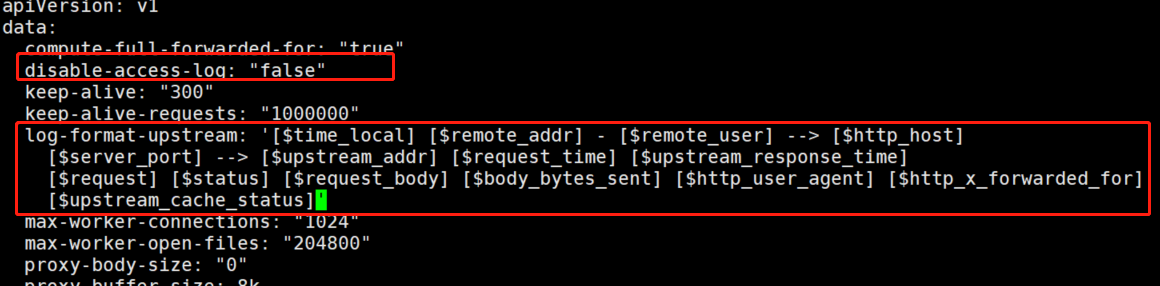
2.执行如下命令,编辑 ingress-nginx ConfigMap配置文件,在 keep-alive-requests 字段下添加日志配置内容,将 disable-access-log 设为 false 开启日志:
kubectl edit cm -n anyshare nginx-configuration-class-443
log-format-upstream: '[$time_local] [$remote_addr] - [$remote_user] --> [$http_host]
[$server_port] --> [$upstream_addr] [$request_time] [$upstream_response_time]
[$request] [$status] [$request_body] [$body_bytes_sent] [$http_user_agent] [$http_x_forwarded_for]
[$upstream_cache_status]‘
3.执行如下命令,备份 ingress rule-443 资源配置,并修改配置。
备份 ingress rule-443 资源配置命令如下:
kubectl get ing rule-443 -n resource -o yaml > /tmp/resource_rule-443.yaml

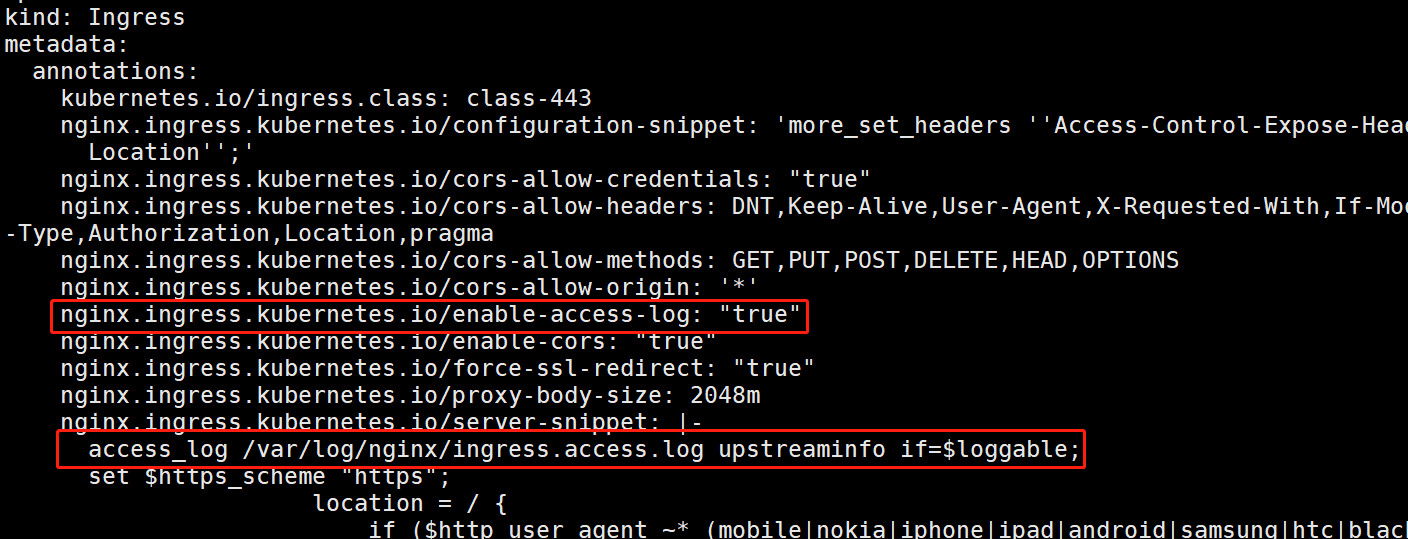
修改配置如下,annotations 中增加两行配置内容。
kubectl edit ing -n resource rule-443
nginx.ingress.kubernetes.io/enable-access-log: "true"
access_log /var/log/nginx/ingress.access.log upstreaminfo if=$loggable;
4.自动重载配置生效,无需重启服务。
注意:日志会生成在 ov 节点的 nginx-ingress-controller 容器。
kubectl exec -it -n anyshare nginx-ingress-controller-class-443-mjz7q -- bash

更多信息
生产环境获取日志后要及时关闭日志输出,避免产生大量业务日志占用存储空间。